If you only wish to extract the alpha value for a color, you can simply extract it like so:
<?php
$color = imagecolorat($im, 50, 50);
$alpha = $color >> 24;
?>
It actually shifts off the first 24 bits (where 8x3 are used for each color), and returns the remaining 7 allocated bits (commonly used for alpha)imagecolorallocatealpha
(PHP 4 >= 4.3.2, PHP 5, PHP 7, PHP 8)
imagecolorallocatealpha — Asignar un color para una imagen
Descripción
imagecolorallocatealpha() se comporta de forma idéntica a
imagecolorallocate() con la adición del parámetro de
transparencia alpha.
Parámetros
imageUn recurso image, es devuelto por una de las funciones de creación de imágenes, como imagecreatetruecolor().
red-
Valor del componente rojo.
green-
Valor del componente verde.
blue-
Valor del componente azul.
alpha-
Un valor entre
0y127.0indica completamente opaco mientras que127indica completamente transparente.
red, green
y blue son enteros
entre 0 y 255 o hexadecimales entre 0x00 y 0xFF.
Valores devueltos
Un identificador de color o false si la asignación falló.
Advertencia
Esta función puede
devolver el valor booleano false, pero también puede devolver un valor no booleano que se
evalúa como false. Por favor lea la sección sobre Booleanos para más
información. Use el operador
=== para comprobar el valor devuelto por esta
función.
Historial de cambios
| Versión | Descripción |
|---|---|
| 5.1.3 |
Devuelve false si falló la asignación. Anteriormente
devolvía -1.
|
Ejemplos
Ejemplo #1 Ejemplo usando imagecolorallocatealpha()
<?php
$tamaño = 300;
$imagen=imagecreatetruecolor($tamaño, $tamaño);

// para obtener un fondo blanco con borde negro
$fondo = imagecolorallocate($imagen, 255, 255, 255);
$borde = imagecolorallocate($imagen, 0, 0, 0);
imagefilledrectangle($imagen, 0, 0, $tamaño - 1, $tamaño - 1, $fondo);
imagerectangle($imagen, 0, 0, $tamaño - 1, $tamaño - 1, $borde);

$amarillo_x = 100;
$amarillo_y = 75;
$rojo_x     = 120;
$rojo_y     = 165;
$azul_x     = 187;
$azul_y     = 125;
$radio      = 150;

// asignar colores con valores alfa
$amarillo = imagecolorallocatealpha($imagen, 255, 255, 0, 75);
$rojo     = imagecolorallocatealpha($imagen, 255, 0, 0, 75);
$azul     = imagecolorallocatealpha($imagen, 0, 0, 255, 75);

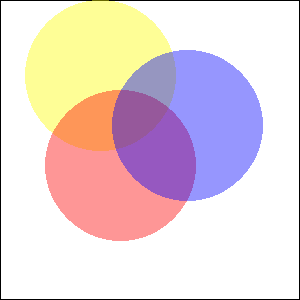
// dibujar 3 círculos traslapados
imagefilledellipse($imagen, $amarillo_x, $amarillo_y, $radio, $radio, $amarillo);
imagefilledellipse($imagen, $rojo_x, $rojo_y, $radio, $radio, $rojo);
imagefilledellipse($imagen, $azul_x, $azul_y, $radio, $radio, $azul);

// ¡no olvide imprimir la cabecera correcta!
header('Content-Type: image/png');

// y finalmente, imprimir el resultado
imagepng($imagen);
imagedestroy($imagen);
?>
El resultado del ejemplo sería algo similar a:
Ver también
- imagecolorallocate() - Asigna un color para una imagen
- imagecolordeallocate() - Desasignar un color de una imagen
Improve This Page
+add a note
User Contributed Notes 3 notes
eric (at) junioronline.us 
18 years ago
Brett G 
8 years ago
When working with transparency, avoid imagecreate() and use imagecreatetruecolor() instead. Transparency effects may not work as expected within a palette-based image.
fjoggen at gmail dot com 
16 years ago
If you need to calculate the integer representation of a color with an alpha channel, without initialising an image and using the imagecolorallocatealpha function. Then this function might be of some help:

<?php
function alphaColor($hexColor,$alpha)
{
        return bindec(decbin($alpha).decbin(hexdec($hexColor));
}

echo alphaColor("FFFFFF",127);
?>